Simon Ryder
Members
-
Joined
-
Last visited
Everything posted by Simon Ryder
-
No worries, good luck. I was advised by my mechanic mate to pump the brake pedal when engine is off first? Two/three pumps and it stiffens up. Something to do with balancing the pressure? It does feel like a win when you start the car and it all works, for a fraction of the price.
-
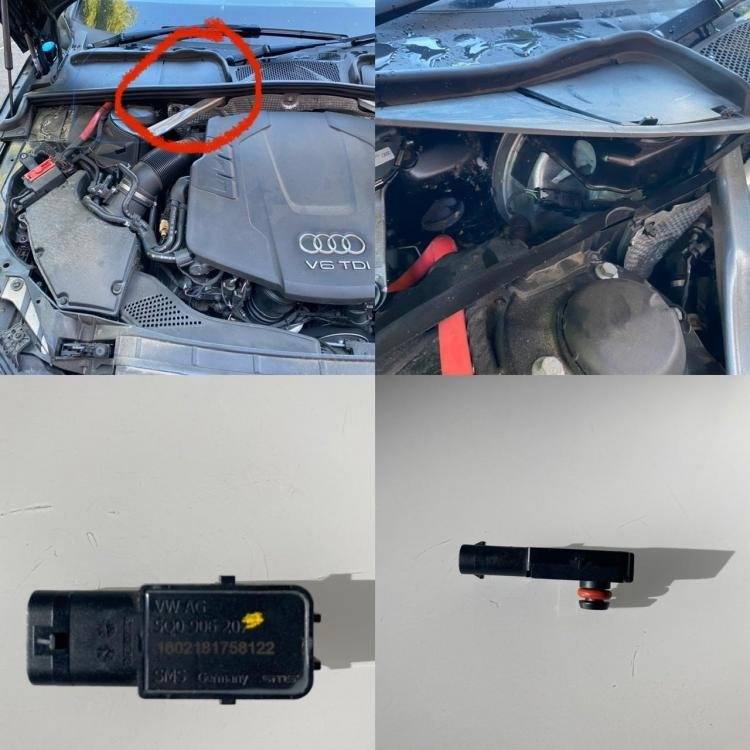
Hope this helps. I’ve circled in red the area of the sensor. It’s under a plastic flap. You have to pull the rubber edge off to lift up. The sensor pulls vertically off. You then slide a plastic holding clamp off the other end. Just reverse the process to put the new one back in. It’s really simple and annoying that everyone seems to want to charge a couple of hundred pounds for this??!?
-
Yep, it took literally a minute to unplug the old one and replace with the new one. All the warnings have gone off and the brake feels normal again.
-
Hi, I had exactly the same problem as you all have reported. I ordered a Brake servo pressure sensor from the Audi Parts Department at my local Audi dealership. It was really really easy to replace like for like. I have no experience with car maintenance. I’ve got the A4 and it was to the top left of the engine compartment, under a plastic covering that lifted up. I’d recommend having a go. It cost me £75 for the part.