


Stubok
Members
-
Joined
-
Last visited
-
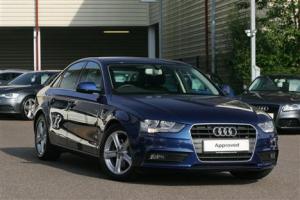
Hello all. Well, I picked up my new car yesterday,and I have to say it's absolutely stunning, both in looks, and to drive. The only disappointment immediatley is the MPG. I did a 20 mile trip to work this morning and drove VERY sensibly, aircon off and not over revving. The majority of the journey was on dual carridgeway and motorway, and when I got to work, it stated that I'd averaged 51.2 MGP. Now, while that's very good compared to my old car, it's nowhere near the stated MPG from Audi. Is there a magic setting on the car somewhere, or should I only expect to hit near 60 on a constant motorway cruise for a couple of hours? Any input welcome BTW, picture attached. It was the colour that swayed me :-)
-
Hi all I'm picking up my A4 2.0 (163) diesel Technik on Wednesday and can't wait. I probably should have come on here before taking the plunge, but as soon as I test drove it, I loved it. Any advice or flags on recurring issues I should be aware of? thanks
